ECITIE Online Services: The Complete Student Information System Guide [2026]
The Electronic Campus Information Exchange (ECITIE) is a comprehensive Student Information System designed to support and enhance education management across the entire campus community.
Through ECITIE Online Services, students can securely access their academic and personal information anytime and anywhere, making student administration faster, easier, and more efficient.
ECITIE Online Services for Students
My Info – Student Information Access
Students can view the following information online:
Online Registration Services
Students can perform the following actions through ECITIE online services:
Standard Academic Activities (Every Semester)
All activities are conducted according to the Institute’s Academic Calendar.
Semester Registration and Student Status
| Activity | Week / Period | Details |
|---|---|---|
| Semester Registration (Returning Students) | Week 0 – Week 1 | Obtain invoice number and payment amount via ECITIE online services |
| Complete payment through CIMB Clicks | ||
| Register semester online after 3 days of payment (subject to financial clearance) | ||
| Online Semester Registration Closed | Week 2 | Registration from this week onward is considered late registration |
| Late Semester Registration | Week 2 | Registration allowed with RM50 penalty |
| Must be done at the Academic Affairs Counter | ||
| End of Registration Period | Week 3 | Students who fail to register will be deferred or terminated |
| Students who register semester but not subjects will have status revoked (Defer / Terminate) | ||
| Appeal to Reactivate Student Status | Before Week 5 | Mental health appeals must include a medical certificate confirming fitness |
Deferment from Study
| Activity | Week / Period | Details |
|---|---|---|
| Deferment Application Period | Week 1 – Week 4 | Submit official deferment form to Academic Affairs Division (AAD) |
| Mid-Semester Deferment | Week 5 – Week 9 | All subjects withdrawn |
| Grade “W” assigned | ||
| Withdrawn credits count as Credits Taken but are excluded from GPA/CGPA | ||
| Late Deferment | From Week 10 onwards | Only allowed for medical reasons with valid medical certificate |
Subject Registration: Add, Drop, and Withdraw
| Activity | Week / Period | Details |
|---|---|---|
| Add Subjects (Online) | Week 0 – Week 1 | Requires Academic Advisor approval |
| Adding beyond allowed credits (over 18 or 12 credits) not permitted online | ||
| Appeal to Add Subject Form required | ||
| Drop Subjects (Online) | Week 1 – Week 4 | Subjects may be dropped online |
| Adding subjects is not allowed during this period | ||
| Verify Subject Registration | Week 3 – Week 4 | Verify, save, or print Subject Registration Slip via ECITIE |
Academic Activities Lifecycle
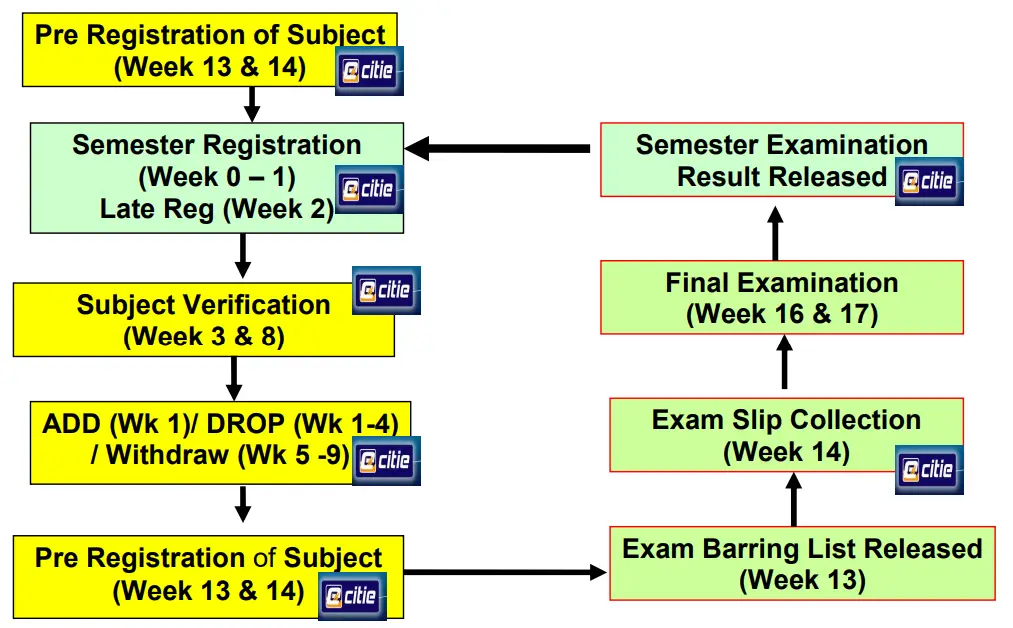
The Academic Activities Lifecycle outlines the sequence of academic processes that every student must follow each semester until the completion of their studies. Students are required to use ECITIE Online Services at each stage of this lifecycle.
For new students, the lifecycle begins with semester registration.
For returning students, the process starts with subject pre-registration.
How to Use ECITIE – Online Services
Student information is managed through the Student Management System, which is accessible via the web using ECITIE Online Services. All registered UniKL students are automatically granted access to the online services immediately after successfully completing their first-time registration as a new student.
UniKL uses ECITIE Online Services as the primary platform for delivering official announcements and student-related information. Printed letters will not be issued, except in special cases.
How to Log in to ECITIE Online Services
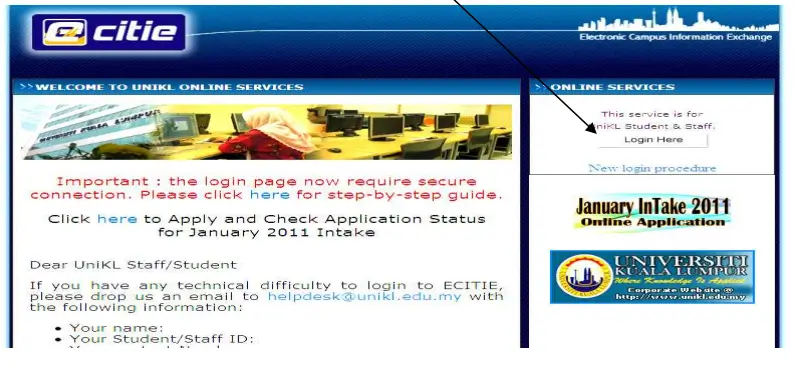
Next is the actual login page.
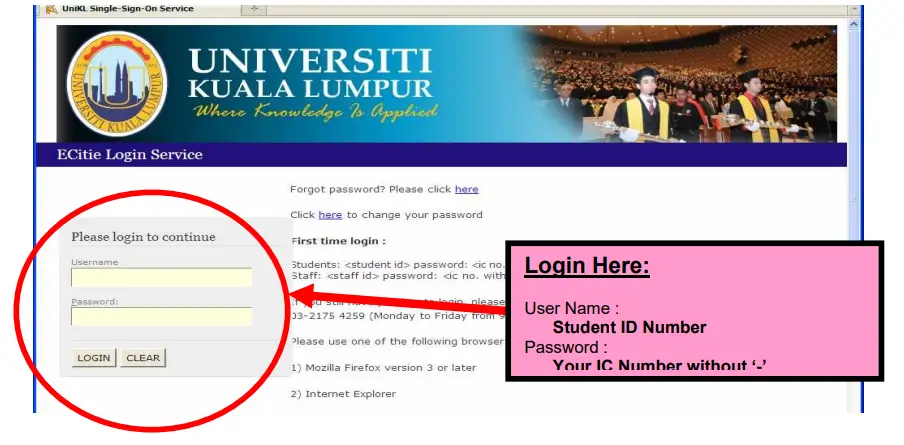
The default password can be changed upon successfully entered the online.
What If I Forgot My Password?
If you forget your ECITIE password, you may recover it using one of the following methods:
Option 1: Contact Academic Affairs Division (AAD)
You may contact the Academic Affairs Division (AAD) to request a password reset. Once reset, your password will be reverted to your IC number.
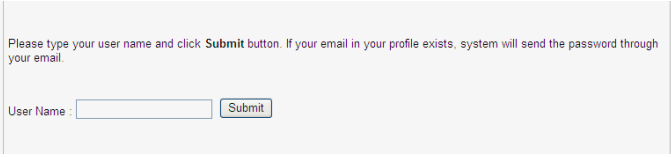
Option 2: Use the “Forgot Password” Feature
On the ECITIE login page, click “Forgot password? Please click here”.
To receive a system-generated response, ensure that your email address is updated and correct in the ECITIE system.
I Cannot Access ECITIE
If you are confident that your username and password are correct, your student status may be inactive.
Students who are on deferment or who have completed their studies but have not yet graduated are still allowed to access ECITIE Online Services.
For further assistance or clarification regarding your access status, please contact the Academic Affairs Division (AAD).
Semester Registration
What Is Semester Registration?
Semester Registration is the official process that allows a student to become an active and registered student for a specific semester. All students must complete semester registration through ECITIE Online Services within the approved registration period.
Online semester registration:
Students who fail to complete semester registration within the stipulated timeline may be deferred or terminated by the University.
How Much Do I Have to Pay Every Semester?
Each semester, students are required to pay two types of fees:
a. Registration Fee
The registration fee includes:
Payment details:
b. Tuition Fee
For sponsored students, payments are made directly to UniKL by the sponsoring body.
For self-sponsored students, payment must be completed during semester registration.
Students are only allowed to register for the semester after both registration and tuition fees have been fully paid.
How to Register for a Semester
Online semester registration is available one (1) week before classes begin and closes on Friday night of Academic Week 1.
Semester Registration Steps
- Obtain Invoice Information
Students must first obtain their invoice number and payment amount from MyLedger in ECITIE Online Services, even before the online registration period opens.
(Please refer to announcements from the Finance Department of your respective institute for confirmation.)
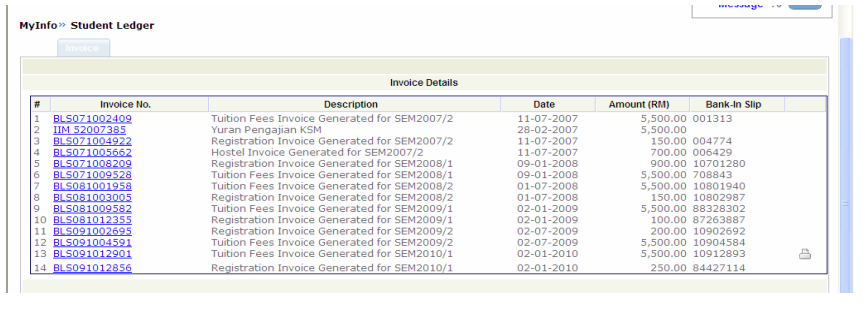
Students must pay the registration fee (RM250/ RM300) + Hostel fee + any outstanding
fee. The payment must be made using internet banking (CIMBClick) or bank in using
CIMB Bank in Slip (Collect Service).
c. After 3 days of payment, students can register themselves through online services as
shown below once the online is opened.
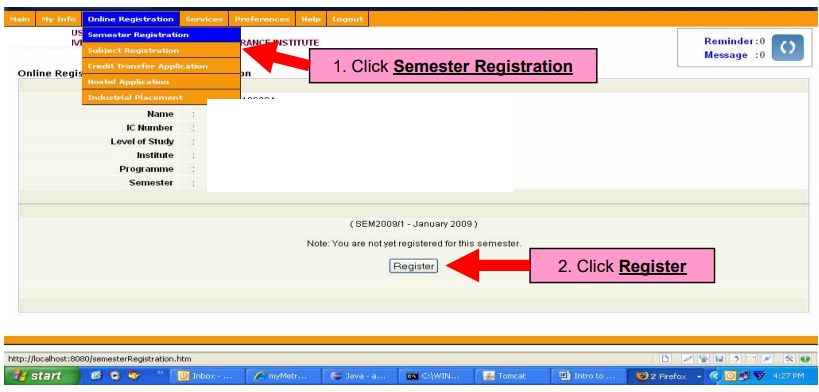
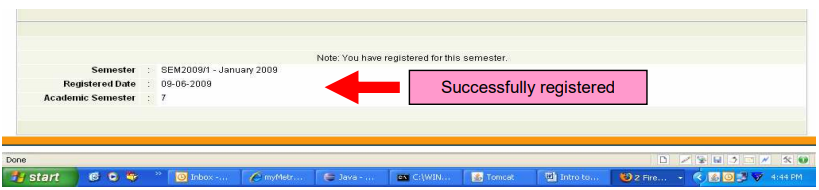
If the payment has been cleared and the student has no outstanding, the system
will indicate the registration date (refer screen below).
I HAVE PAID RM250 BUT THE SYSTEM ASKS ME TO CONTACT FINANCE?
There are two possibilities:
a. If you are under loan, your sponsorship status may be outdated – please check with
Students Affairs Department
b. If you have previous outstanding (example previous unpaid tuition fee), you need to
settle your outstanding fee or contact finance department for more information/ for
clearance.
Importance of ECITIE Online Services
ECITIE Online Services provide students with 24/7 access to academic, administrative, and financial information in one centralized platform.
The system simplifies processes such as semester registration, subject management, and timetable viewing.
It ensures accurate communication through official online announcements and updates.
Overall, ECITIE enhances efficiency, transparency, and effective academic planning for students.
Documents Required for ECITIE Online Services
FAQs (Frequently Asked Questions)
Conclusion
The ECITIE Online Services act as a centralized Student Information System that simplifies academic, administrative, and financial processes for UniKL students. Through ECITIE, students can efficiently manage semester registration, subject registration, class timetables, examinations, and results within one secure digital platform.
By offering 24/7 online access, accurate updates, and transparent communication, ECITIE Online Services support effective academic planning, reduce administrative delays, and enhance the overall student experience from admission to graduation.